The short version
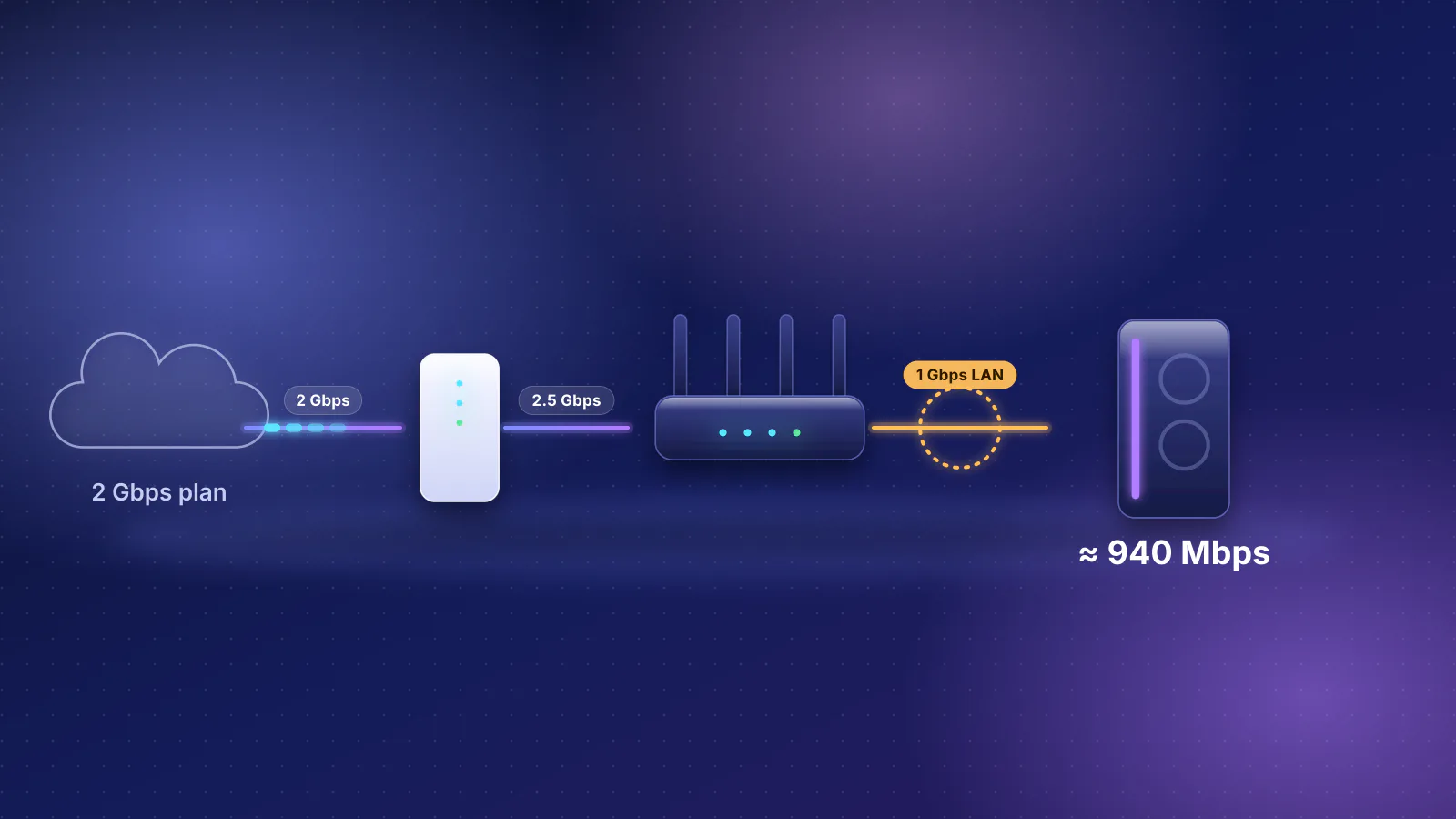
- Every link between two devices has to be 2.5G: the router's LAN port (not just its internet port), every switch in the path, the cable, and the network port or adapter in each computer and NAS. One 1 Gbps hop holds that path to about 940 Mbps.
- Your existing cable is probably fine. IEEE's 802.3bz objectives define 2.5 Gbps over up to at least 100 m of Cat5e in defined deployments, and Apple's cable table lists Cat5e for 2.5 and 5 Gbps.
- Expect about 2.35 Gbps, not 2.5. That's the TCP data a 2.5 Gbps link carries after framing and headers by RouterHaus's arithmetic below, or about 294 MB/s for a file copy. It's still more than a 2 Gbps plan delivers, so the plan stays the limit for internet traffic.
- The hardware is cheap; the computers are the question. Catalog builds start at $209.99 for a router with four 2.5 Gbps LAN ports, and the cheapest 2.5G switch in the catalog, Ubiquiti's five-port Flex Mini 2.5G, is $54 with Ubiquiti's US surcharge. Network cards, USB adapters, NAS units and cable runs aren't in our catalog: price them separately.
- For Wi-Fi 7 access points, buy a 2.5G PoE switch. Every tri-band Wi-Fi 7 access point in our catalog with a 2.5 Gbps port lists PoE+ (802.3at) power, at 20.7 to 25.4 W maximum.
This is a buying guide for a new 2.5 Gbps network. If you already have multi-gig gear and a speed test is stuck near 940 Mbps, start with how to find a multi-gig bottleneck instead.
What 2.5GBASE-T is, and the cable it needs
2.5GBASE-T and 5GBASE-T are defined by IEEE 802.3bz, which the IEEE-SA Standards Board approved on September 22, 2016. They were designed for the cable already in buildings. The objectives the IEEE 802.3 working group approved in March 2015 say:
- Define a 2.5 Gb/s PHY for operation over "Up to at least 100m on four-pair Class D (Cat5e) balanced copper cabling on defined use cases and deployment configurations".
- Define a 5 Gb/s PHY for up to at least 100 m on Class E (Cat6), and up to 100 m on Class D (Cat5e), with the same qualifier.
- Keep the standard Ethernet frame format, "Support Auto-Negotiation" and "Support PoE".
"Defined use cases and deployment configurations" means the standard doesn't promise every Cat5e run in every bundle. Apple's table is less hedged: its support page for its 10 Gigabit Ethernet port marks Category 5e as supported at 2.5 and 5 Gbps for cables up to 100 m (328 ft), and Category 6 at every speed from 100 Mbps to 10 Gbps, at 10 Gbps only up to 55 m. Internet providers are more cautious: GFiber's 2 Gig plan guide says cable "Must be Cat5e or newer (Cat6 recommended)".
Auto-negotiation is why mixing speeds works: a 2.5G switch port also runs at 1 Gbps or 100 Mbps for a TV or printer. For new in-wall runs, see which cable to buy for a retrofit; the short answer is solid-copper Cat6, which carries 5 Gbps at full length and 10 Gbps on shorter runs.
What has to be 2.5G
A 2.5 Gbps network is a chain, and each piece has its own spec line to check:
| Link | What it needs | The common trap |
|---|---|---|
| Router internet port | 2.5 Gbps or faster, if your plan is above 1 Gbps | Only matters for internet traffic. Copies between your own devices never use it. |
| Router LAN port | For internet traffic above 1 Gbps, at least one 2.5 Gbps LAN port: for the switch, or for the one PC that needs it | A multi-gig internet port with only 1 Gbps LAN ports. See the count below. |
| Switch | 2.5 Gbps on every port in the path, including the uplink to the router | An old gigabit switch left in the middle, or a gigabit switch inside a wall plate or mesh unit |
| Cable | Cat5e or better, end to end, including patch cords | A Cat5 or unmarked cord from a drawer. Read the jacket. |
| PC or Mac | A built-in 2.5 Gbps or faster port, a PCIe card, or a USB adapter in a fast enough port | A 2.5G adapter in a slow USB port (see adapters) |
| NAS | A 2.5 Gbps or faster port, and drives fast enough to fill it | A NAS whose disks, not its port, are the limit |
| Wi-Fi access point | A 2.5 Gbps port and, on a ceiling, a 2.5G PoE switch port | A 1 Gbps PoE switch under 2.5G access points |
The router LAN port is the trap the catalog shows most clearly. Of the 67 current routers and gateways (not mesh kits or travel routers) in the RouterHaus catalog with a 2.5 Gbps or faster internet port, 50 have at least one LAN-only port at 2.5 Gbps or faster, and 19 of those have exactly one. The other 17 have none; the bottleneck guide lists the Wi-Fi 7 routers among them. The catalog counts ports labeled WAN/LAN as internet ports, so four of those 17 can still give one device a multi-gig port by repurposing a second multi-gig WAN/LAN port. A router with one 2.5G LAN port is fine: put a 2.5G switch on it. With none, a switch can't give one device more than about 940 Mbps of internet, as our multi-gig router guide explains, though a 2.5G switch still speeds up copies between the devices on it.
How fast 2.5GbE really runs
A 2.5 Gbps link carries 2.5 Gbps of frames, not 2.5 Gbps of file. The overhead section of our bottleneck guide works through the bytes from RFC 6349 and RFC 7323: each standard 1,500-byte packet takes 1,538 bytes of wire time, of which 1,460 are data after IPv4 and TCP headers, or 1,448 with the TCP timestamp option. Here is what that means for copies at 2.5 Gbps.
RouterHaus's arithmetic, a best case on a clean link:
| Case | Calculation | Data rate | As a copy speed |
|---|---|---|---|
| IPv4, no TCP options | 2,500 Mbps × 1,460 ÷ 1,538 | 2,373 Mbps | 297 MB/s |
| IPv4 with timestamps | 2,500 Mbps × 1,448 ÷ 1,538 | 2,354 Mbps | 294 MB/s |
| IPv6 with timestamps (20 bytes more header) | 2,500 Mbps × 1,428 ÷ 1,538 | 2,321 Mbps | 290 MB/s |
| For comparison: 1 Gbps, IPv4 with timestamps | 1,000 Mbps × 1,448 ÷ 1,538 | 941 Mbps | 118 MB/s |
Copy speed is the data rate divided by 8, in decimal megabytes. At those rates a 100 GB file takes about 5 minutes 40 seconds over 2.5GbE and about 14 minutes 10 seconds over gigabit (100,000 MB ÷ 294.2 MB/s and ÷ 117.7 MB/s). The 1 Gbps row is the familiar 940 Mbps result; the same ratio, about 94%, applies at every speed.
A copy between two machines can't beat about 294 MB/s on one 2.5G link, so a NAS or SSD that reads faster than that is held back by the link. When that's worth fixing is covered in our 10GbE article.
- Internet plan 2,000 Mbps: the limit
- Router internet port 2.5 Gbps, about 2,354 Mbps of data
- Router routing No published figure for most routers in our catalog
- Router LAN port 2.5 Gbps
- 2.5G switch Uplink and device ports at 2.5 Gbps
- Cat5e or Cat6 cable 2.5 Gbps up to 100 m
- PC 2.5GbE port or adapter
Computers: built-in ports, cards and USB adapters
Desktop PCs
Check the motherboard's spec page first; it names the network chip. Intel lists its Ethernet Controller I226-V at "2.5G" per port on a PCIe 3.1 interface, and Realtek describes its RTL8125BG as an integrated 2.5G Ethernet controller for PCI Express applications, aimed at desktops, laptops and workstations, on a one-lane PCIe bus. If the board has a 1 Gbps chip instead, a 2.5GbE PCIe card is the tidy fix. Our catalog doesn't price network cards: price them separately.
Laptops and USB adapters
A USB 2.5GbE adapter needs a fast USB port. GFiber's 2 Gig guide says an adapter "must be plugged into a high-speed USB port (USB 3.0 or newer)" with current drivers, and that without multi-gig hardware, devices "will typically max out at 1 Gbps".
The USB Implementers Forum (USB-IF), which publishes the USB specifications, now recommends naming ports by speed: the USB4 and USB 3.2 specifications identify "80Gbps, 40Gbps, 20Gbps, 10Gbps, and 5Gbps", and "USB 5Gbps" means a product that "signals at 5Gbps". So look for a port labeled 5Gbps or faster, or listed as USB 3 in a spec sheet. That's a signaling rate, and USB-IF's naming guide gives no figure for usable throughput, so treat a 5Gbps port as the minimum for a 2.5G adapter rather than as double the headroom. Thunderbolt and USB4 ports carry USB too; Apple lists the Mac mini's Thunderbolt ports with support for "USB 4 (up to 40Gb/s)".
Adapter prices aren't in our catalog either: price separately, and check that the adapter's maker lists drivers for your operating system.
Macs
Apple's current specs cover the range:
- Mac mini: a "2.5Gb Ethernet port (configurable to 10Gb Ethernet)" on every current model, M6 and M5 Pro. The 10Gb option is Nbase-T, with support for 1, 2.5, 5 and 10Gb.
- Mac Studio: "10Gb Ethernet (Nbase-T Ethernet with support for 1Gb, 2.5Gb, 5Gb, and 10Gb Ethernet using RJ-45 connector)". It links at 2.5 Gbps to a 2.5G switch and is ready for 10G later.
- MacBook Pro: no Ethernet port in Apple's specifications, so it needs an adapter in a Thunderbolt port.
Once connected, confirm the negotiated speed rather than trusting the label: in macOS it's under System Settings, Network, Details, Hardware, and in Windows in the Ethernet connection's properties, as the bottleneck guide shows.
The NAS
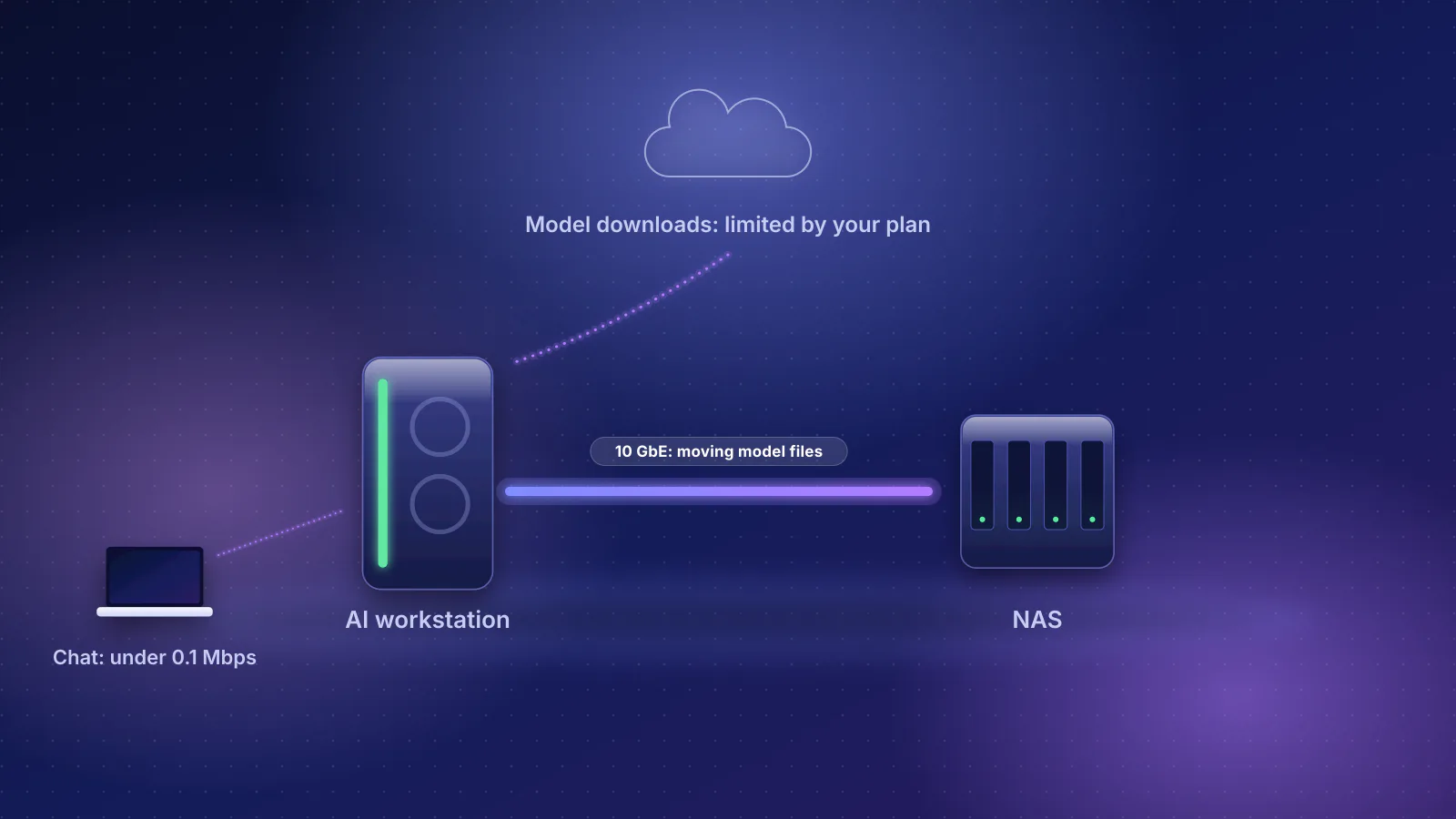
Synology, for example, lists two 2.5GbE ports on its four-bay DS925+. Whether a 2.5 Gbps port is the limit depends on the drives; our NAS and workstation guide works through that per machine. NAS prices aren't in our catalog: price separately.
2.5G switches in the catalog
These are a selection of the current switches in the RouterHaus component catalog with 2.5 Gbps RJ45 ports and a recorded price; the catalog at /data lists more. Prices are each maker's own list or store price, checked October 20, 2026; Ubiquiti's US store adds a surcharge, shown first with the price before it in brackets. Power is the maker's stated maximum.
| Switch | Ports | Management | PoE out | Max power, cooling | Maker's price |
|---|---|---|---|---|---|
| Ubiquiti Switch Flex Mini 2.5G | 5 × 2.5G | Managed, needs a UniFi controller | None | 6.4 W | $54 ($49) |
| NETGEAR MS305 | 5 × 2.5G | Unmanaged | None | 9.24 W, fanless | $134.99 list (NETGEAR's store showed a lower sale price when checked) |
| Zyxel XMG-108 | 8 × 2.5G, 1 × SFP+ (1G/10G) | Unmanaged | None | 9.12 W, fanless | $89.99 |
| Ubiquiti Switch Flex 2.5G | 8 × 2.5G, 10G uplink (RJ45/SFP+ combo) | Managed, needs a UniFi controller | None | 14 W | $175 ($159) |
| Zyxel XMG1915-10E | 8 × 2.5G, 2 × SFP+ (1G/10G) | Smart: web or Nebula cloud | None | 14.49 W, fanless | $199.99 |
| MikroTik CRS310-8G+2S+IN | 8 × 2.5G, 2 × SFP+ (1G/2.5G/10G) | Managed: RouterOS or SwitchOS | None | 34 W, 1 fan | $219 suggested |
| Zyxel XMG-105HP | 5 × 2.5G (4 with PoE), 1 × SFP+ (1G/10G) | Unmanaged | 802.3bt, 70 W total | 90 W, fanless | $99.99 |
| Zyxel XMG-108HP | 8 × 2.5G, 1 × SFP+ (1G/10G) | Unmanaged | 802.3bt on all 8, 100 W total | 120 W, fanless | $149.99 |
| Ubiquiti Switch Flex 2.5G PoE | 8 × 2.5G, 10G uplink (RJ45/SFP+ combo) | Managed, needs a UniFi controller | 802.3bt on all 8; 196 W with the separate $79 adapter | 210 W | $219 ($199) |
| Zyxel XMG1915-10EP | 8 × 2.5G, 2 × SFP+ (1G/10G) | Smart: web or Nebula cloud | 802.3bt on all 8, 130 W total | 163 W, fanless | $299.99 |
| TP-Link SG2210XMP-M2 | 8 × 2.5G, 2 × SFP+ | Smart: standalone web or Omada | 802.3at on all 8, 160 W total | 195.7 W, fanless | $379.99 list (TP-Link's store showed $256.99 on sale) |
Two things stand out. The 8-port Zyxel XMG-108 lists for less than the 5-port NETGEAR MS305's list price, so a 5-port switch isn't automatically the cheap choice outside the UniFi line. And the catalog's PoE switches for 2.5G start at $99.99 for four powered ports.
Unmanaged, smart or managed
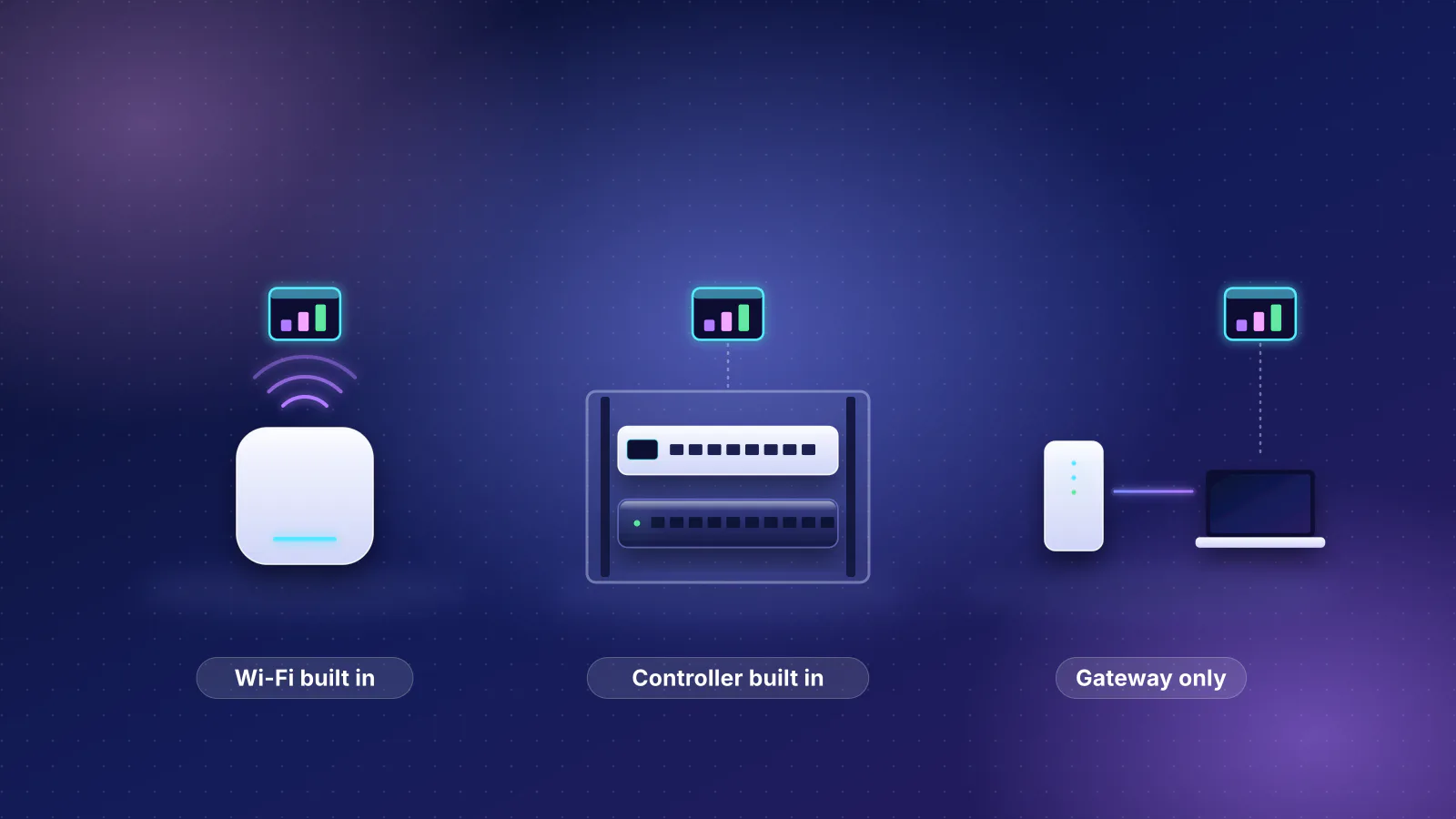
An unmanaged switch has no settings: every port is on one network, and it works out of the box. A smart or managed switch adds settings, the important one at home being VLANs, separate networks on the same cables. You need one wherever networks split: a port feeding an access point that broadcasts separate main, IoT and guest Wi-Fi networks, or wired devices on different networks on the same switch. Our VLAN guide explains where, and our managed vs unmanaged comparison covers the other reasons to pay for management. If you'll never run VLANs, unmanaged is simpler and, in this table, cheaper.
Management also ties you to an ecosystem. The Ubiquiti Flex switches in the table are managed through a UniFi controller (Ubiquiti lists UniFi Network 8.6.9 or later for the Flex Mini 2.5G), which runs on Ubiquiti's cloud gateways, such as the UniFi Express 7 and Cloud Gateway Max. TP-Link's Omada switch lists standalone web management as well as an Omada controller, and Zyxel's XMG1915 can switch between standalone and Zyxel's "license-free Nebula cloud management".
SFP+ uplinks: useful, with one catch
An SFP+ slot on a 2.5G switch is a 10 Gbps socket for a module or a direct-attach cable. It earns its place in two cases: a 10G NAS or workstation on an otherwise 2.5G switch, and a 10G link between two switches, so that a copy between floors doesn't share one 2.5G cable with everything else. The catch is speed support. Zyxel's spec table lists its slots as "1G SFP/10G SFP+", with no 2.5G, so don't count on the slot for a link to a router's 2.5 Gbps port; use a 2.5G RJ45 port for that. MikroTik says the CRS310-8G+2S+IN's slots "support multiple data rates: 1G, 2.5G, and 10G". Ubiquiti's Flex 2.5G models have one 10G uplink that Ubiquiti's store describes as an RJ45/SFP+ combination port: use the jack or the slot, not both. Ubiquiti's tech specs list the 10G jack at 10G, 5G, 2.5G, 1G and 100M but the SFP+ slot at 10G and 1G only, so a router's 2.5 Gbps port can feed the jack, not the slot. Modules, cables and compatibility are covered in the SFP+ section of our router guide.
Heat and fans
2.5G switches without PoE draw little power. By makers' stated maximums, the 8-port NETGEAR MS308 (not in the table: $199.99 list) draws 7.98 W, about 1 W per port, while TP-Link's 8-port 10G TL-SX1008 draws 31.2 W, about 3.9 W per port, and has a fan (our arithmetic from the makers' figures). Every non-PoE Zyxel and NETGEAR 2.5G switch in the table is fanless by its maker's spec. The MikroTik has one fan; check before putting it on a desk.
PoE models list large maximums, but most of that is power delivered down the cable and turned into heat at the access point, not in the switch. Our closet design guide works out the share that stays in the closet. Fans appear on bigger PoE switches: TP-Link lists two fans on its 240 W SG3210XHP-M2 and none on the 160 W SG2210XMP-M2.
PoE for Wi-Fi 7 access points
Ceiling access points take power over their Ethernet cable (PoE). For a Wi-Fi 7 access point, that cable should be 2.5G as well: all 22 current Wi-Fi 7 access points in our catalog list a 2.5 Gbps or faster port. On a 1 Gbps PoE switch, each one is held to about 941 Mbps, shared by every client on it.
How much power they need is less than some guides suggest. TP-Link's own Omada guide (July 2026) says PoE++ "is required for Wi-Fi 7 access points with tri-band radios (30–60W)", although its summary says only that they "often require PoE++". The makers' spec sheets for the access points in our catalog show many don't: all seven tri-band (6 GHz) Wi-Fi 7 access points with a 2.5 Gbps port list PoE+ (802.3at) input, at 20.7 to 25.4 W maximum, TP-Link's EAP772 among them at 25.4 W. Some do need PoE++: four tri-band models list 802.3bt, TP-Link's 39 W EAP783 among them, and all four have 10 Gbps ports, though three other 10 Gbps models, including TP-Link's EAP773, list PoE+. So read each access point's own spec sheet; a switch with 802.3bt ports, like the Zyxel and Ubiquiti PoE models above, can power either kind within its total budget.
The budget is what limits the count. TP-Link's guide gives PoE+ as "up to 30W at the PSE and up to 25.5W at the device", and switches can reserve that 30 W per port. Sized that cautious way (our arithmetic): the XMG-105HP's 70 W powers two PoE+ access points, the XMG-108HP's 100 W three, the XMG1915-10EP's 130 W four, the SG2210XMP-M2's 160 W five, and the Flex 2.5G PoE six, but only with its separately sold 210 W adapter (196 W of PoE); Ubiquiti lists far less when it's powered over PoE itself. Whether a switch reserves by class or by actual draw changes those counts; our mesh vs access points comparison works through it, and our PoE planning worksheet adds cameras and cable losses.
A 2.5G access-point link rarely limits internet traffic on a 2 Gbps plan, because the plan is lower. It can limit Wi-Fi clients copying to a NAS. Wi-Fi link rates aren't throughput, as the bottleneck guide explains.
Three builds and what they cost
Routers and gateways used below, rendered from the catalog:
| Product | Internet port | Fastest LAN port | Maker's routing, plan or wired-speed figure | Price |
|---|---|---|---|---|
| GL.iNet Flint 3 (GL-BE9300) Router · Wi-Fi 7 |
2.5 Gbps | 2.5 Gbps | Not published | $209.99 Manufacturer store price, checked October 20, 2026 |
| Ubiquiti UniFi Express 7 (UX7) Router · Wi-Fi 7 |
10 Gbps | 2.5 Gbps | Not published | $219.00 Manufacturer store price incl. US store surcharge (list $199.00), checked October 20, 2026 |
| NETGEAR Nighthawk RS200 Router · Wi-Fi 7 |
2.5 Gbps | 2.5 Gbps | Not published | $229.99 Manufacturer store price, checked October 20, 2026 |
| ASUS RT-BE86U Router · Wi-Fi 7 |
10 Gbps | 2.5 Gbps | Not published | $269.99 Manufacturer store price, checked October 20, 2026 |
| ASUS TUF Gaming BE9400 (TUF-BE9400) Router · Wi-Fi 7 |
2.5 Gbps | 2.5 Gbps | Not published | $279.99 Manufacturer store price, checked October 20, 2026 |
| Ubiquiti UniFi Cloud Gateway Max (UCG-Max) Gateway · no Wi-Fi |
2.5 Gbps | 2.5 Gbps | Not published | $219.00 Manufacturer store price incl. US store surcharge (list $199.00), checked October 20, 2026 |
LAN-only 2.5 Gbps ports, from the catalog: three on the Flint 3, RT-BE86U and TUF Gaming BE9400; one on the UniFi Express 7 (its only LAN port) and the NETGEAR RS200 (whose other three LAN ports are 1 Gbps); four on the Cloud Gateway Max, which has no Wi-Fi. The Flint 3 has a fourth 2.5 Gbps LAN port, LAN 1, which GL.iNet lets you switch to a second WAN (so the catalog counts it as an internet port). The RT-BE86U adds a 10 Gbps WAN/LAN port that can serve a device when you use the 2.5 Gbps one for the internet. One caution on the Cloud Gateway Max: the catalog price is Ubiquiti's "From" price without storage; the default configuration with an SSD was $279 ($307 with surcharge) when checked.
1. Small: one PC at 2.5 Gbps
A router with a 2.5G LAN port and one cable to the PC. No switch. This suits a 2 Gbps plan with one desktop that should see the full plan.
2. Medium: NAS and two PCs
Four 2.5G connections: NAS, two PCs and an uplink. A router with three or more 2.5G LAN ports, such as the Flint 3, takes the NAS and both PCs with no switch; on the Flint 3, LAN 1 is left as one spare 2.5G port unless you use it as a second WAN. A router with one 2.5G LAN port takes a 2.5G switch on it, and the NAS and PCs go on the switch, so copies between them run port to port and never cross the router, the layout our NAS and workstation guide recommends.
- NAS Synology rates the DS925+ at up to 522 MB/s read
- NAS 2.5GbE port About 2,354 Mbps, shared by both PCs
- 2.5G switch Port to port, no router
- PC 1 and PC 2 About 1.2 Gbps each when both copy at once
3. Prosumer: 8-port 2.5G PoE switch and Wi-Fi 7 access points
A gateway or router with a 2.5G LAN port, an 8-port 2.5G PoE switch on it, two ceiling Wi-Fi 7 access points and room for wired devices. The UniFi version runs its controller on the Cloud Gateway Max. The mixed-brand version uses an unmanaged Zyxel switch and TP-Link Omada access points in standalone mode; it can't separate networks with VLANs unless you swap the switch for the $299.99 smart XMG1915-10EP, $150 more, and use a router that supports VLANs. On the Zyxel, use a 2.5G RJ45 port for the uplink, because its SFP+ slot doesn't list 2.5G. On the Flex 2.5G PoE, the 10G RJ45 jack lists 2.5G among its speeds, so the uplink can go there and leave all eight PoE ports for devices.
| Build | Catalog parts | Catalog subtotal | Price separately |
|---|---|---|---|
| 1. Small | GL.iNet Flint 3 ($209.99) or NETGEAR RS200 ($229.99) or UniFi Express 7 ($219, or $199 before surcharge) | $209.99 | The PC's 2.5GbE card or adapter if it has no 2.5G port; a Cat5e or better cable |
| 2. Medium, no switch | GL.iNet Flint 3: NAS and both PCs on its three 2.5G LAN ports | $209.99 | NAS and drives; PC cards or adapters; cables. In the no-switch build, the Flint 3's LAN 1 is the only spare 2.5G port. |
| 2. Medium, UniFi | UniFi Express 7 ($219) + Switch Flex Mini 2.5G ($54) | $273 ($248) | |
| 2. Medium, mixed brands | NETGEAR RS200 ($229.99) + Zyxel XMG-108 ($89.99): eight 2.5G ports and an SFP+ slot | $319.98 | |
| 3. Prosumer, UniFi | Cloud Gateway Max ($219) + Switch Flex 2.5G PoE ($219) + its 210 W adapter ($79) + 2 × U7 Pro ($208 each) | $933 ($855) | A cable run to each access point; NAS; PC cards or adapters. Omada's central management needs a controller (see below). |
| 3. Prosumer, mixed brands | GL.iNet Flint 3 ($209.99) + Zyxel XMG-108HP ($149.99) + 2 × TP-Link EAP772 ($204.99 each) | $769.96 |
Each further access point adds $208 ($189) for a U7 Pro, up to six on the Flex 2.5G PoE by class, or $204.99 for an EAP772, up to three on the XMG-108HP, which brings that build to $974.95 (TP-Link's store showed the EAP772 on sale at $179.99 when checked). The Flint 3 is used where its 2.5G LAN ports help; any router in the table with a 2.5G LAN port works in builds 1 and 3. For Omada, TP-Link's EAP772 page lists standalone web management plus centralized management through an Omada controller; the mesh vs access points comparison covers that and the other costs these totals leave out.
Frequently asked questions
Is my existing Cat5e cable good enough for 2.5GbE?
Usually. IEEE's 802.3bz objectives define 2.5 Gbps over up to at least 100 m of Cat5e for defined use cases and deployment configurations, and Apple's cable table lists Cat5e for 2.5 and 5 Gbps up to 100 m. GFiber recommends Cat6 for its 2 Gig plan. If a device links at 1 Gbps, swap the patch cords first.
Will a 2.5G switch make my internet faster?
Only if your plan is faster than 1 Gbps and the router has a 2.5 Gbps LAN port for the switch. Otherwise it speeds up copies between devices on the switch, such as a NAS and a PC, and leaves internet speed where it was.
Can I plug 1 Gbps devices into a 2.5G switch?
Yes. Ports negotiate the fastest speed both ends support, so a TV or printer links at 1 Gbps or 100 Mbps on the same switch while a PC links at 2.5 Gbps. The 802.3bz objectives require support for Auto-Negotiation.
Why does my 2.5GbE copy show about 290 MB/s, not 312 MB/s?
Framing and headers take about 6% of the link. By RouterHaus's arithmetic from RFC 6349 figures, a 2.5 Gbps link carries about 2,354 Mbps of TCP data with IPv4 and timestamps, about 294 MB/s, and slightly less with IPv6. Slower drives at either end lower it further.
Should I skip 2.5G and go straight to 10G?
Only where the drives at both ends can use it. A 2.5G link tops out near 294 MB/s, and a fast NAS can exceed that: Synology rates the DS925+ at up to 522 MB/s read. 10GBASE-T switches cost more, draw more power, and need Cat6A for full-length runs. A switch with an SFP+ slot lets you add one 10G link later.
Sources
Read on November 7, 2026. Product ports, power, cooling and prices come from the RouterHaus catalog (checked October 20, 2026), published at /data, and the maker pages it cites.
- IEEE 802.3: P802.3bz 2.5G/5GBASE-T Task Force (completed with IEEE Std 802.3bz-2016) and its objectives as approved in March 2015 (PDF) (Cat5e and Cat6 at 100 m, Auto-Negotiation, PoE)
- IEEE 802.3 NGBASE-T reflector: Approval of IEEE Std 802.3bz 2.5GBASE-T and 5GBASE-T (September 22, 2016)
- NBASE-T Alliance (now part of the Ethernet Alliance): NBASE-T Alliance celebrates approval of 2.5/5G Ethernet standard (September 27, 2016)
- Apple: About the 10 Gigabit Ethernet port on Mac (cable categories and speeds)
- GFiber: 2 Gig plan overview (cable, adapters, USB 3.0)
- IETF RFC 6349: Framework for TCP throughput testing and RFC 7323: TCP extensions for high performance (frame overhead, timestamps option)
- USB-IF: USB 3.2 and USB Data Performance Language Usage Guidelines (PDF)
- Intel: Ethernet Controller I226-V specifications and Realtek: RTL8125BG(S)-CG
- Apple: Mac mini tech specs, Mac Studio tech specs and MacBook Pro tech specs
- Synology: DS925+
- TP-Link Omada: PoE vs PoE+ vs PoE++ (July 23, 2026; power at the switch and device; Wi-Fi 7 statements) and IEEE 802.3bt-2018
- Zyxel: XMG-100 series specifications and XMG1915 series (Nebula) and XMG1915 series datasheet, 09/01/25 (PDF) (power, PoE budget, fanless); MikroTik: CRS310-8G+2S+IN; NETGEAR: MS305 and MS308; TP-Link: TL-SX1008
- Ubiquiti: Switch Flex Mini 2.5G, Switch Flex 2.5G, Switch Flex 2.5G PoE, AC Adapter 210W, U7 Pro, U7 Pro Max, U7 Pro Wall, Cloud Gateway Max and UniFi Express 7 tech specs, and Ubiquiti's US store pages for prices
- TP-Link Omada: SG2210XMP-M2, SG3210XHP-M2, EAP772, EAP773 and EAP783 specifications
- NETGEAR: WBE710 and WBE718; EnGenius: ECW516L (PoE input and maximum power)
- GL.iNet: Flint 3 (GL-BE9300) (ports; LAN 1 switchable to WAN); NETGEAR: Nighthawk RS200; ASUS: RT-BE86U tech specs