The short version
- Nine Wi-Fi 7 routers in our catalog list at $200 or less, and eight are dual-band: 2.4 and 5 GHz only, with no 6 GHz band and therefore no 320 MHz channels. The one tri-band model, the UniFi Express 7, costs $219 at Ubiquiti's US store once its surcharge is added; its $199 list price is what puts it on the list.
- The missing 6 GHz band costs less peak speed than the box suggests. Apple lists its Wi-Fi 7 iPhones at the same 2,400 Mbps maximum on 5 GHz as on 6 GHz, both at 160 MHz. What you lose is a band that older devices can't crowd, which matters most in apartments and busy homes with 6 GHz devices.
- All nine have an internet port of 2.5 Gbps or faster, but six have only gigabit LAN ports. On a 2 Gbps plan, a wired PC behind them gets about 940 Mbps. The ASUS RT-BE59, GL.iNet Flint 3e and UniFi Express 7 have a faster LAN port.
- Picks by rule: on a plan up to 1 Gbps, the ASUS RT-BE55 ($129.99) is the cheapest app-based model with documented MLO and no paid add-on. On a 2 Gbps plan, the GL.iNet Flint 3e or ASUS RT-BE59 ($179.99 each). For 6 GHz, only the UniFi Express 7.
- The main caveat: prices are manufacturer prices from our catalog, checked October 20, 2026, and our catalog marks the ASUS and GL.iNet ones as not re-confirmed. Specs are the makers' own; RouterHaus didn't test any of these routers.
Which routers qualify
The rule: every current single-unit Wi-Fi 7 router in the RouterHaus catalog whose maker's list price is $200 or less (catalog checked October 20, 2026). That's 9 of the catalog's 42 current Wi-Fi 7 routers. Mesh kits, travel routers and wired gateways are left out because they're different products; models with no published price are left out because we can't say what they cost.
| Product | Internet port | Fastest LAN port | Maker's routing, plan or wired-speed figure | Price |
|---|---|---|---|---|
| MikroTik hAP be lite (A42G-HbeP) Router · Wi-Fi 7 |
2.5 Gbps | 1 Gbps | 1.4 Gbps | $79.00 List price, checked October 20, 2026 |
| ASUS RT-BE55 Router · Wi-Fi 7 |
2.5 Gbps | 1 Gbps | Not published | $129.99 Manufacturer price (not re-confirmed), checked October 20, 2026 |
| ASUS RT-BE58U Router · Wi-Fi 7 |
2.5 Gbps | 1 Gbps | Not published | $149.99 Manufacturer price (not re-confirmed), checked October 20, 2026 |
| NETGEAR Nighthawk RS100 Router · Wi-Fi 7 |
2.5 Gbps | 1 Gbps | Not published | $149.99 Manufacturer store price, checked October 20, 2026 |
| ASUS TUF Gaming BE3600 (TUF-BE3600) Router · Wi-Fi 7 |
2.5 Gbps | 1 Gbps | Not published | $179.99 Manufacturer price (not re-confirmed), checked October 20, 2026 |
| ASUS RT-BE59 Router · Wi-Fi 7 |
2.5 Gbps | 2.5 Gbps | Not published | $179.99 Manufacturer price (not re-confirmed), checked October 20, 2026 |
| GL.iNet Flint 3e (GL-BE6500) Router · Wi-Fi 7 |
2.5 Gbps | 2.5 Gbps | Not published | $179.99 Manufacturer price (not re-confirmed), checked October 20, 2026 |
| NETGEAR Nighthawk RS150 Router · Wi-Fi 7 |
2.5 Gbps | 1 Gbps | Not published | $199.99 Manufacturer store price, checked October 20, 2026 |
| Ubiquiti UniFi Express 7 (UX7) Router · Wi-Fi 7 |
10 Gbps | 2.5 Gbps | Not published | $219.00 Manufacturer store price incl. US store surcharge (list $199.00), checked October 20, 2026 |
Three things the table doesn't show at a glance:
- "Not published" in the routing column is the norm here. Only MikroTik publishes routing tests (RFC 2544 lab tests on specialist test equipment, totals across all ports), and the table shows the hAP be lite's lower figure (routing with 25 firewall rules, 1,518-byte packets), not its fast-path one. For the others, a 2.5 Gbps port is the only evidence of what they can carry.
- Some LAN numbers understate the router. Our catalog counts ports labeled WAN/LAN as internet ports. The Flint 3e has a fifth 2.5 Gbps port that can be either; the RT-BE58U and TUF Gaming BE3600 have a 2.5 Gbps WAN/LAN port and a 1 Gbps one, and whichever isn't the internet port can serve a device. On a plan faster than 1 Gbps the 2.5 Gbps port has to be the internet port, so wired devices get 1 Gbps ports.
- Nine more current Wi-Fi 7 routers have no published price in our catalog, five of them tri-band (among them the D-Link R95 and TP-Link Archer BE550). Whether they fit under $200 is unknown, so they aren't here.
What each one leaves out
From the catalog, which records each maker's spec page, datasheet or manual. "Not published" means the maker's documents don't say either way; it doesn't mean the feature is missing.
Wi-Fi
| Router | Bands | Widest channel | 5 GHz link rate (maker) | MLO |
|---|---|---|---|---|
| MikroTik hAP be lite | 2.4 + 5 GHz | Not published | 2,882 Mbps | Documented |
| ASUS RT-BE55 | 2.4 + 5 GHz | 160 MHz | 2,882 Mbps | Documented |
| ASUS RT-BE58U | 2.4 + 5 GHz | 160 MHz | 2,882 Mbps | Documented |
| NETGEAR Nighthawk RS100 | 2.4 + 5 GHz | 160 MHz | Not given separately (3.6 Gbps for both bands) | Not published |
| ASUS TUF Gaming BE3600 | 2.4 + 5 GHz | 160 MHz | 2,882 Mbps | Documented |
| ASUS RT-BE59 | 2.4 + 5 GHz | 160 MHz | 4,320 Mbps | Documented |
| GL.iNet Flint 3e | 2.4 + 5 GHz | 160 MHz | 5,764 Mbps | Documented |
| NETGEAR Nighthawk RS150 | 2.4 + 5 GHz | 160 MHz | 4.3 Gbps | Not published |
| UniFi Express 7 | 2.4 + 5 + 6 GHz | 320 MHz (6 GHz) | 4.3 Gbps | Documented |
Ports, software and add-ons
| Router | Wired ports | SQM | Paid add-ons | Mesh |
|---|---|---|---|---|
| MikroTik hAP be lite | 2.5G internet; 3 × 1G LAN | Yes (CAKE queue type in RouterOS) | None: "No subscriptions, paywalls or locked features" | Not published (CAPsMAN manages MikroTik access points) |
| ASUS RT-BE55 | 2.5G internet; 4 × 1G LAN | Not published (Adaptive QoS) | None listed | AiMesh |
| ASUS RT-BE58U | 2.5G and 1G WAN/LAN; 3 × 1G LAN | Not published (Adaptive QoS) | None listed | AiMesh |
| NETGEAR RS100 | 2.5G internet; 4 × 1G LAN | Not published (no QoS documented) | NETGEAR Armor (optional, after a trial) | Not published |
| ASUS TUF Gaming BE3600 | 2.5G and 1G WAN/LAN; 3 × 1G LAN | Not published (Adaptive QoS, Game Boost) | None listed | AiMesh |
| ASUS RT-BE59 | 2.5G internet; 1 × 2.5G and 3 × 1G LAN | Not published (no QoS listed) | None listed | AiMesh |
| GL.iNet Flint 3e | 2.5G internet; 2.5G WAN/LAN; 3 × 2.5G LAN | Yes | None required | No: GL.iNet lists it as unsupported for its mesh |
| NETGEAR RS150 | 2.5G internet; 3 × 1G LAN | Not published (no QoS documented) | NETGEAR Armor (optional, after a trial) | Not published |
| UniFi Express 7 | 10G internet; 1 × 2.5G LAN | Yes (Smart Queues, below 300 Mbps) | CyberSecure, optional, $99 per unit a year | UniFi |
Paid add-on prices are from the makers' pages, checked October 29, 2026: Ubiquiti's store lists Enhanced Cyber Security (CyberSecure) at $99 per unit, billed annually. NETGEAR's RS100 and RS150 pages offer Armor Plus as a 30-day free trial, then an introductory $59.98 for the first year, after which it renews automatically at $149.99 a year until canceled; introductory prices change, so check before you sign up. Neither is needed for the router to work. A fuller comparison is in router subscriptions compared.
The box numbers ("BE3600", "BE5000") are roughly the sum of each band's maximum rate. For the RT-BE55, ASUS lists 688 Mbps on 2.4 GHz and 2,882 Mbps on 5 GHz: 688 + 2,882 = 3,570 Mbps, rounded to 3600 (arithmetic). No single phone or laptop uses both at full rate.
Which gaps matter for your home
No 6 GHz band
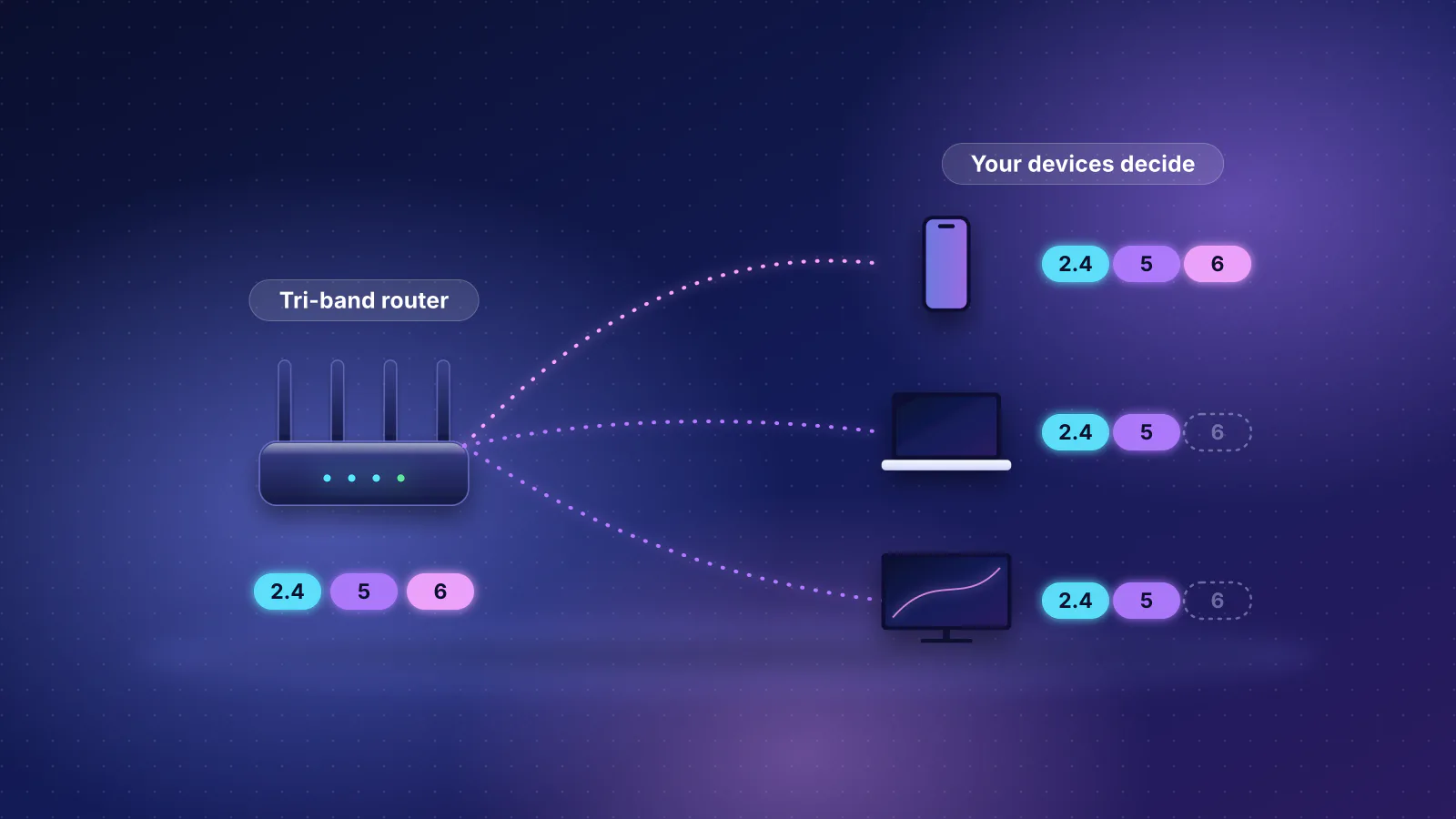
This is the gap all but one model share, and its cost is mostly about congestion, not peak speed. Older Wi-Fi 5 and Wi-Fi 6 devices can't use 6 GHz at all (the Wi-Fi Alliance created the Wi-Fi 6E name for Wi-Fi 6 devices that can), and the Alliance says the band adds room for seven 160 MHz channels. On 5 GHz, your router shares the air with every older device in your home and your neighbors'.
For many devices, though, the top link rate is the same either way. Apple's deployment guide lists its Wi-Fi 7 iPhones (iPhone 16 through 18 Pro, Air and Duo, but not the 16e or 17e) at 2,400 Mbps on 5 GHz and on 6 GHz, both at 160 MHz and two streams. A dual-band router that supports 160 MHz on 5 GHz, as seven of these do, can give an iPhone the same maximum link rate as a tri-band one. The catch is that a 160 MHz channel on 5 GHz needs DFS (radar-shared) channels: eero notes that a network that detects radar there "will dynamically switch to 80 MHz operation" until the channel is clear again, which halves the top rate, and TP-Link's footnotes add that 160 MHz on 5 GHz may be unavailable in some countries. 6 GHz channels aren't subject to DFS. Link rates aren't throughput: real transfers are lower and fall with distance.
- The gap matters if you live in an apartment or a dense neighborhood, have several 6 GHz devices (Wi-Fi 7 iPhones, laptops with Intel's BE200 card) and use them close to the router, or if a gaming PC or laptop that supports 6 GHz is on Wi-Fi rather than a cable.
- It barely matters if most of your devices are Wi-Fi 5 or 6, which includes some current game consoles: Microsoft lists the Xbox Series X with 802.11ac (Wi-Fi 5) dual-band Wi-Fi (see what each console supports). A 6 GHz band does nothing for them directly.
More on the 6 GHz trade-offs, including how far it reaches, is in the router guide's 6 GHz section, and the generation choice itself in Wi-Fi 6, 6E or 7: which to buy.
No 320 MHz channels
Wi-Fi 7's widest channel exists only on 6 GHz: the Wi-Fi Alliance describes 320 MHz channels as "available in countries that make the 6 GHz band available to Wi-Fi", and TP-Link's spec footnotes say the same. So every dual-band router here stops at 160 MHz. It matters only for devices that support 320 MHz: Intel rates its BE200 laptop card at 5.8 Gbps with 320 MHz channels, while Apple lists its iPhones and its N1-chip Macs at 160 MHz. For an iPhone, 320 MHz on the router changes nothing.
Gigabit-only LAN ports
Every model has an internet port of 2.5 Gbps or faster, so all of them can take in a 2 Gbps plan. What one wired device gets is set by the LAN port it plugs into. Gigabit Ethernet carries about 940 Mbps of real data (arithmetic: 1,448 bytes of data in each 1,538 bytes on the wire), and 2.5 Gbps about 2.35 Gbps.
- Internet plan 2 Gbps
- Router internet port 2.5 Gbps
- Router LAN port 1 Gbps: about 940 Mbps of data
- Desktop PC Wired, 2.5 Gbps network card
- It doesn't matter on a plan of 1 Gbps or less, or if everything that needs speed is on Wi-Fi.
- It matters on a 2 Gbps plan with a wired PC, console downloads you want at full speed, or a NAS. Then you want the RT-BE59 (one 2.5G LAN port), the Flint 3e (four 2.5G ports available for devices) or the Express 7 (one). A 2.5 Gbps switch on that one port adds more fast ports; see where multi-gig speed gets lost.
MLO not documented
NETGEAR doesn't document Multi-Link Operation for the RS100 or RS150; the other seven document it. On a dual-band router, MLO can only combine 2.4 and 5 GHz, and its benefit depends on what your phone or laptop implements: Wi-Fi 7 MLO explained covers which devices do what. Treat it as a small plus, not a reason to buy.
SQM, add-ons and management
- SQM (smart queue management) keeps latency down when someone else is uploading or downloading. Three models document it, with limits (on the hAP be lite, as RouterOS's CAKE queue type): Ubiquiti doesn't recommend its Smart Queues on connections of 300 Mbps or more, and GL.iNet says SQM "works best for low-bandwidth or congested networks" and may reduce peak throughput on fast ones. ASUS documents priority QoS instead, and the RT-BE59's spec sheet lists no QoS at all. If games or calls lag only when the line is busy, read the bufferbloat and SQM guide before choosing.
- Paid add-ons are optional on all three models that offer them, but the NETGEAR models come with a trial that turns into a renewal offer, and Ubiquiti charges per unit.
- Management style differs more than the hardware. ASUS and NETGEAR use a consumer app plus a web page. GL.iNet uses a local web admin panel, with an optional app. MikroTik's RouterOS, which our method rates as advanced, is powerful and unforgiving. The UniFi Express 7 runs the UniFi Network application; our catalog leaves its account-free local management as "Not published" because we couldn't confirm it in Ubiquiti's documentation.
One unit, one area
A single router of any price covers about 1,800 sq ft with drywall by our rule of thumb (less with plaster or masonry), and a home with two or more floors and more than about 1,200 sq ft in total needs at least one access point per floor. The seven coverage claims the makers publish for these models run from 1,750 to 2,500 sq ft. If your home needs two units, mesh support matters more than any gap above: the four ASUS models (AiMesh) and the Express 7 (UniFi) document it; the Flint 3e doesn't support GL.iNet's mesh, and NETGEAR and MikroTik don't document mesh for these models.

Picks by rule
Each pick comes from a stated rule applied to the tables above, using catalog prices. They're independent of any store or commission (RouterHaus has no affiliate links).
| Your situation | Rule | Pick | What you give up |
|---|---|---|---|
| Plan up to 1 Gbps, want app-based setup | Cheapest model on a consumer app-based platform (rated beginner-friendly in our method) with documented MLO and local management and no paid add-on listed | ASUS RT-BE55, $129.99 (price not re-confirmed) | 6 GHz, multi-gig LAN, USB; no SQM documented |
| Plan up to 1 Gbps, comfortable with networking | Cheapest model overall | MikroTik hAP be lite, $79 | 6 GHz, multi-gig LAN; channel width not published; RouterOS is for experienced users |
| 2 Gbps plan with a wired PC or NAS | Cheapest model with a 2.5 Gbps internet port and a 2.5 Gbps LAN-only port; tie broken by number of fast ports | GL.iNet Flint 3e, $179.99 (not re-confirmed); the ASUS RT-BE59 at the same price if you want AiMesh | 6 GHz; on the Flint 3e, mesh; on the RT-BE59, SQM and QoS |
| Several 6 GHz devices, crowded 5 GHz | The only qualifying model with a 6 GHz band | UniFi Express 7, $219 with Ubiquiti's US surcharge ($199 before it) | Just one LAN port (2.5G); the $200 line at checkout; UniFi's app and ecosystem |
| Lag when the line is busy, plan under 300 Mbps | Documented SQM within the maker's stated speed range | UniFi Express 7, Flint 3e or hAP be lite | See each row above |
Why the Flint 3e wins the tie with the RT-BE59: both list at $179.99 with 2.5 Gbps internet ports, but the Flint 3e has four 2.5 Gbps ports available for devices to the RT-BE59's one, and documents SQM. The RT-BE59 is the better fit if your home will need a second unit later, since GL.iNet lists the Flint 3e as unsupported for its mesh.
Same hardware, different price
Two comparisons inside the list are worth knowing before you pay extra:
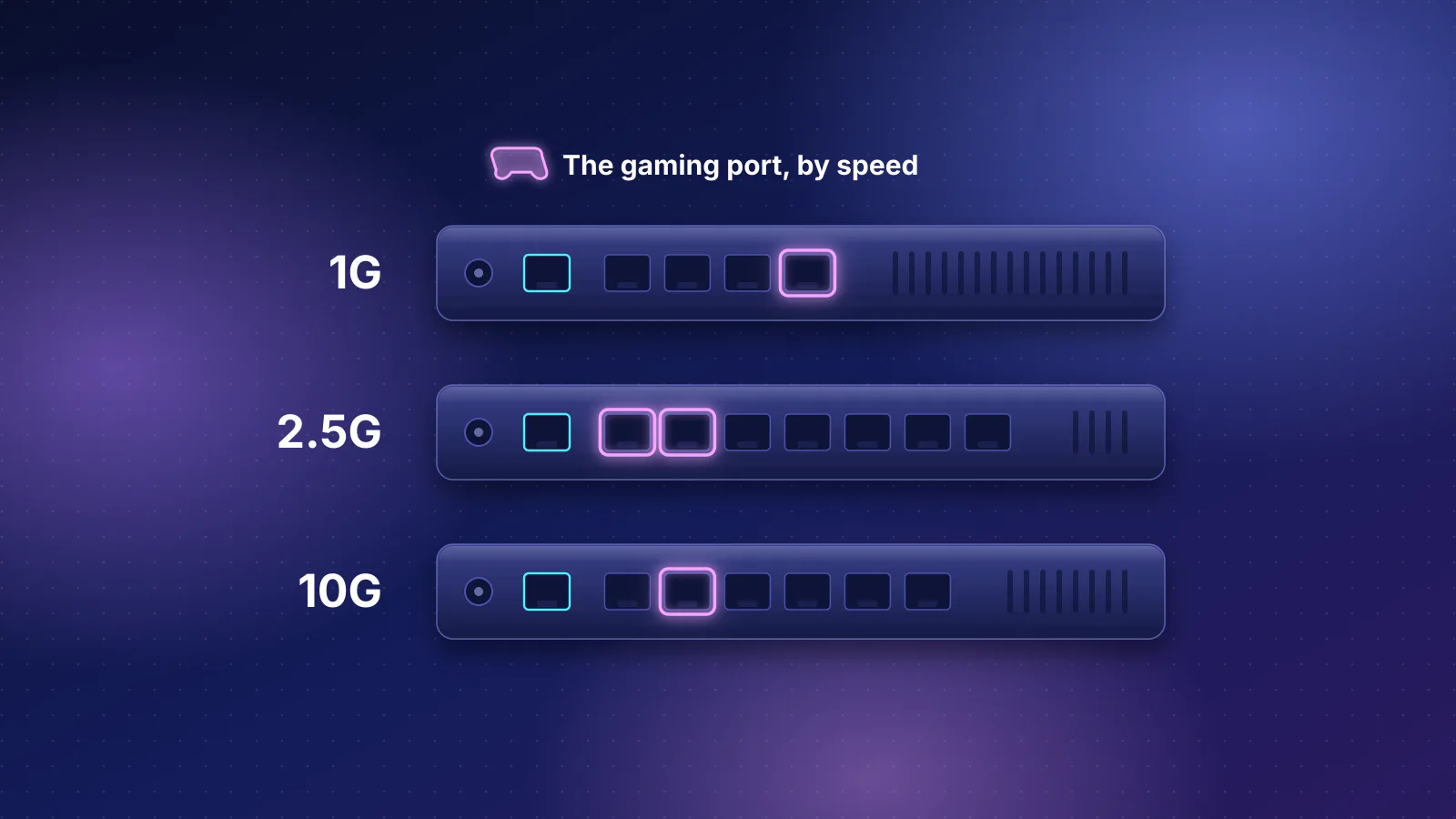
- TUF Gaming BE3600 vs RT-BE58U. ASUS lists the same Wi-Fi rates (688 + 2,882 Mbps), the same two-stream radios, 160 MHz channels and the same port layout (a 2.5G and a 1G WAN/LAN port, three 1G LAN ports, USB). The TUF model adds Game Boost, Mobile Game Mode and a gaming port, which ASUS describes as its LAN4 port at 1G, for $30 more ($179.99 vs $149.99, both not re-confirmed). What those features do is in gaming router vs standard router, and how the gaming models compare is in gaming routers compared.
- NETGEAR RS150 vs ASUS RT-BE59. Both are BE5000-class with a three-stream 5 GHz radio at 160 MHz. The RS150 lists at $199.99; the RT-BE59 at $179.99 adds a 2.5 Gbps LAN port, documented MLO and AiMesh, while NETGEAR documents none of those for the RS150.
When to spend a little more
Just over the line, the catalog has two tri-band routers that fix the main gap without the Express 7's single LAN port:
- GL.iNet Flint 3, $209.99 (GL.iNet store): 6 GHz, five 2.5 Gbps ports, documented SQM and GL.iNet mesh support. GL.iNet doesn't state its channel width; its 5,765 Mbps two-stream 6 GHz rate matches a 320 MHz channel (arithmetic from the 160 MHz rate).
- TP-Link Archer BE600, $249.99 (price not re-confirmed): 6 GHz with 320 MHz, a 10 Gbps internet port and three 2.5 Gbps LAN ports; TP-Link's HomeShield has paid tiers.
The comparison that matters at this budget is often not one router against another but one router against two cheaper units. If your home needs two access points, a mesh kit or two AiMesh routers can beat a better single router; home network setups by budget prices those options.
Frequently asked questions
Is a dual-band Wi-Fi 7 router still worth buying over Wi-Fi 6?
It can be, if it costs about the same. You get 4096-QAM, MLO on most models and, on the eight dual-band models here, a 2.5 Gbps internet port. But without 6 GHz you don't get Wi-Fi 7's widest channels or its least crowded band, so the gain over a good Wi-Fi 6 router is smaller than the name suggests, especially for Wi-Fi 5 and 6 devices that can't use Wi-Fi 7 features at all.
Will a $130 Wi-Fi 7 router handle a 2 Gbps plan?
Its 2.5 Gbps internet port can take the plan in, and Wi-Fi devices and several wired devices can share it. But on models with only gigabit LAN ports, one wired device gets about 940 Mbps at most, and none of these makers except MikroTik publishes a routing throughput figure, so full-speed routing isn't confirmed.
Does MLO work without 6 GHz?
Yes. On a dual-band router, MLO links a Wi-Fi 7 device over 2.4 and 5 GHz. The benefit depends on the device's own MLO mode, which many device makers don't publish, so expect steadier connections rather than double speed.
Why isn't the eero 7 on the list?
Our catalog classes eero units as mesh systems, and this list covers single routers only. The eero 7 is also dual-band Wi-Fi 7 with no 6 GHz; its specs and price are on its product page.
Sources
Read on October 29, 2026.
- MikroTik: hAP be lite product page and specifications and RouterOS: CAKE
- ASUS: RT-BE55 tech specs
- ASUS: RT-BE58U tech specs
- ASUS: RT-BE59 tech specs
- ASUS: TUF Gaming BE3600 tech specs and product page
- NETGEAR: Nighthawk RS100 product page (specifications and Armor Plus introductory terms) and Nighthawk RS150 product page; RS100/RS90/RS70 user manual (5 GHz 20/40/80/160 MHz)
- GL.iNet: Flint 3e (GL-BE6500) product page, Flint 3e user guide and Flint 3 (GL-BE9300) product page and datasheet (2x2 per band)
- GL.iNet: SQM (router docs 4) and Mesh (supported and unsupported models)
- Ubiquiti: UniFi Express 7 tech specs and store page (Enhanced Cyber Security add-on)
- Ubiquiti: UniFi Gateway - Smart Queues
- TP-Link: Archer GE650 product page (footnotes: 320 MHz only on 6 GHz; 160 MHz on 5 GHz may be unavailable in some regions)
- Wi-Fi Alliance: Wi-Fi Alliance introduces Wi-Fi CERTIFIED 7 (January 8, 2024) and Wi-Fi Alliance brings Wi-Fi 6 into 6 GHz (January 3, 2020)
- eero Support: What are wifi channels, and why does channel size matter? (160 MHz on 5 GHz and DFS)
- Apple Platform Deployment: Wi-Fi and Ethernet specifications for Apple devices
- Intel: Wi-Fi 7 BE200 specifications
- Microsoft: Xbox Series X specifications (802.11ac dual band)
- RouterHaus catalog data (bands, maxChannelWidthMHz, mlo, wanPorts, lanPorts, features, msrpUsd and price basis fields)