The short version
- The load is small. By NETGEAR's own idle figures, its CM1200 cable modem idles at about 7 W and its RAXE500 Wi-Fi 6E router at about 17 W; TP-Link lists its TL-SG108 8-port switch at 3.3 W maximum. Even a small home UPS has far more watt capacity than that: APC's Back-UPS 600 is rated 600 VA and 330 W.
- So size by runtime, not by capacity. Runtime comes from the maker's chart for the exact model. APC's Back-UPS Pro chart gives its 1,000 VA model 92 minutes at 40 W and its 1,500 VA model 150 minutes at the same load. APC says runtime "will vary according to device(s), usage, and power settings", so treat any figure as a guide, not a promise.
- Count from the right numbers. A power adapter's rating is a ceiling, not what the device draws: NETGEAR says a router's "power consumption does not exceed the power adapter rating". Use published maximum or idle figures where the maker gives them, and the adapter rating only as an upper bound.
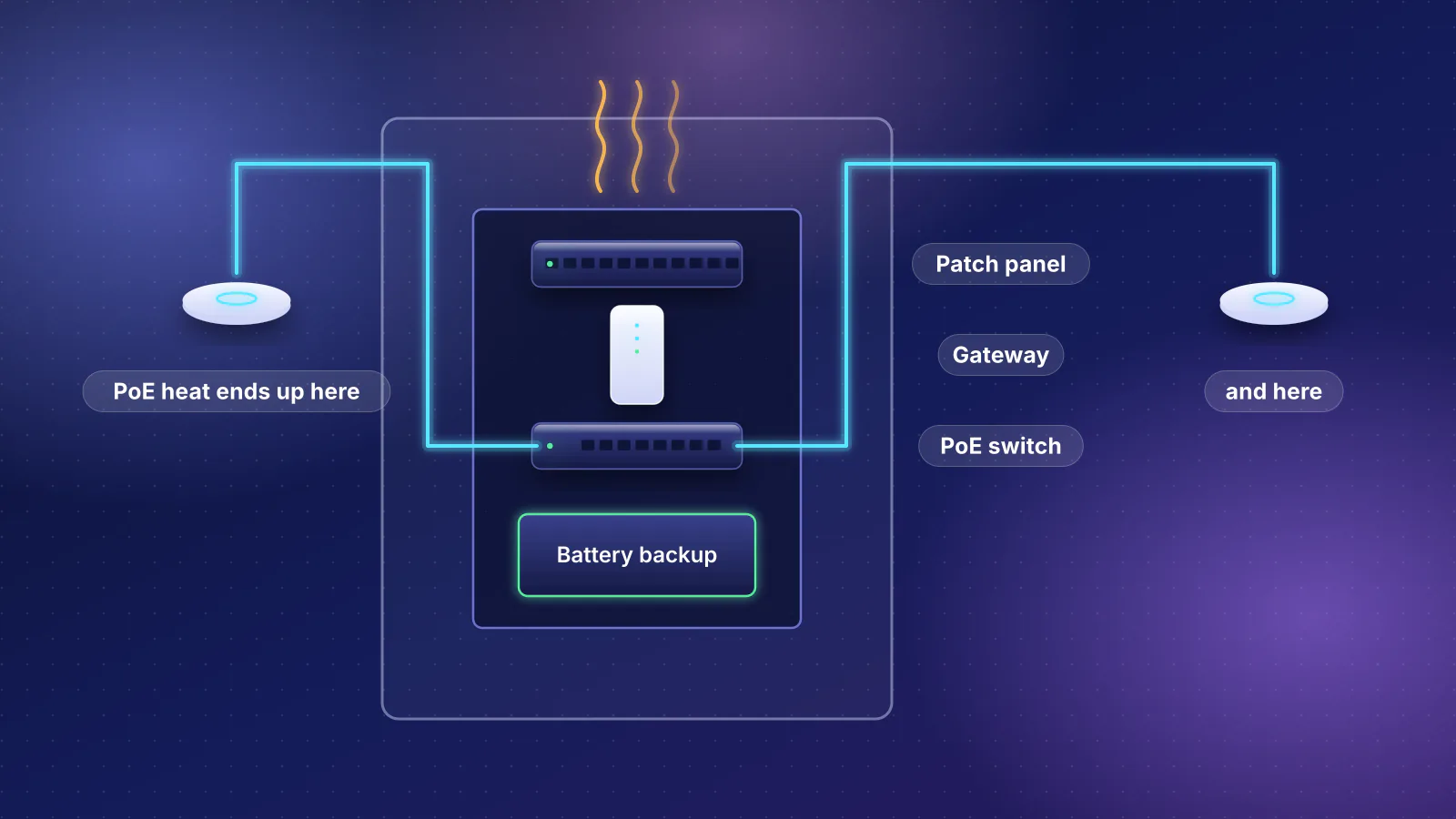
- PoE access points change the picture. Keeping Wi-Fi up means the UPS also powers every access point through the switch: a Ubiquiti U7 Pro is rated up to 21 W, about three times the CM1200 modem's idle figure.
- Your provider's battery is usually for the phone. Verizon's Fios battery unit gives "up to 8 hours" for voice and "does not support Internet or TV service during an outage". The FCC rule behind these batteries covers fixed voice service, not internet.
- Keep it indoors and cool. APC rates its Back-UPS Pro for 32 to 104 °F, and Eaton says battery life halves for every 15 °F of average annual temperature above 77 °F. By that rule, a UPS kept in a hot garage wears through its battery much sooner.
This article is about the battery backup itself. For where the gear and the UPS should live, see the network closet guide's power section; for a second internet line that keeps you online when the provider's network fails, see dual-WAN failover at home.
What has to stay on, and what a UPS can't help with
Internet in a power cut needs every powered box between the provider's line and your device. Which boxes you have depends on the service: a cable modem or a fiber ONT, a router (sometimes built into the provider's gateway), any switch, and any access points or mesh units. If you're not sure which box is which, how to tell which box you have walks through it.
- Provider's network Outside your home; a home UPS can't keep it running
- Modem, ONT or gateway Needs power from the UPS, or from the provider's own battery unit where it covers internet
- Router Needs the UPS
- Switch Needs the UPS; a PoE switch also powers everything plugged into it
- Access points or mesh units Powered over PoE from the switch, or each needs its own outlet on a UPS
- Laptop or phone Runs on its own battery
The FCC's VoIP guide puts the limit plainly: "VoIP service may not work during a power outage or when the internet connection fails or becomes overloaded." A UPS fixes the first part for the equipment in your home. Whether your provider's network stays up in a local power cut is something none of the provider pages we read promise, so test it during your first outage rather than assuming.
Add up the load from the makers' figures
Makers publish three different kinds of power number, and they are not interchangeable:
- Maximum power consumption. The most the device draws, from its spec sheet. Ubiquiti and TP-Link publish this for their gear. It's the right planning figure.
- Idle power. What the device draws switched on with little or no traffic. NETGEAR publishes idle figures for its modems, routers and switches in its small network equipment idle power list. It's closer to what a quiet network uses overnight, but it's not a maximum.
- The power adapter's rating. Volts times amps from the label on the adapter. NETGEAR says a router's "power consumption does not exceed the power adapter rating", which makes it a safe upper bound, but it is not what the device draws. Eaton's sizing steps start from the same label: "These ratings can typically be found on the label on the back of the equipment."
The gap between them is large. The table puts all three side by side for one illustrative cable setup. Each figure is the maker's own; the multiplication is ours, and none of it is a measurement:
| Device (illustrative) | Idle (maker's list) | Maximum or ceiling (maker) | What the ceiling is |
|---|---|---|---|
| NETGEAR CM1200 cable modem | 7.32 W | 18 W | Adapter rating, 12 V × 1.5 A, from the user manual. A ceiling, not the draw. |
| NETGEAR RAXE500 Wi-Fi 6E router | 16.59 W | 60.04 W | Adapter rating, 19 V × 3.16 A, from NETGEAR's adapter list. A ceiling, not the draw. |
| TP-Link TL-SG108 8-port switch | Not in a list we found | 3.3 W | Maximum power consumption, from TP-Link's spec page (its adapter is rated 9 V × 0.6 A, or 5.4 W) |
| Total | About 27 W (with the switch at its maximum) | About 81 W | Sum of the figures on each side |
Real draw sits somewhere between the two totals, and the makers don't publish where. Plan on the higher one: if the real load turns out lower, the runtime at that load is longer than the figure you planned with. Eaton's handbook adds a margin for growth ("Multiply the total by 1.2 to get the grand total. This step accounts for future expansion"), which for a network this size changes very little.
A gateway that combines modem and router, or a fiber ONT, adds its own line. If the maker or provider doesn't publish a figure, the label on the device or its adapter gives the ceiling.
PoE switches and access points
When the switch powers access points or cameras over PoE, the UPS supplies the switch's own draw plus everything it powers. Ubiquiti's figures for its UniFi Lite 8 PoE make the difference clear: 8 W maximum "excluding PoE output", 60 W including it. Two U7 Pro access points, which Ubiquiti rates at up to 21 W each, fit within that switch's 52 W PoE budget, and their power is already inside the switch's 60 W figure, so don't add them again. An illustrative fiber home with a UniFi Cloud Gateway Ultra (6.2 W maximum), that switch and two U7 Pros comes to about 66 W at the makers' maximums, plus the ONT; with the access points unplugged, about 14 W plus the ONT.
That's the decision PoE forces: keeping Wi-Fi up for a whole house multiplies the load. If what you need in an outage is one laptop on a cable, the access points don't have to be on the UPS at all. Our PoE planning guide explains why the PoE budget, the class and the real draw differ, and a managed switch's per-port PoE control lets you switch off ports you don't need on battery.
VA versus watts: reading the box
A UPS has two capacity ratings. Schneider Electric's APC buying guide defines them: "VA (volt-amperes) measures the total power a UPS can handle, while watts measure the actual power your devices consume." Eaton gives the relationship: "Watts = VA * Power Factor or VA = Watts / Power Factor". For these APC models the number in the name is the VA figure, and the watt rating is lower:
| Model | VA | Watts | Source |
|---|---|---|---|
| APC Back-UPS 600 (BE600M1) | 600 VA | 330 W | Schneider Electric product page |
| APC Back-UPS Pro 1000 (BR1000MS) | 1,000 VA | 600 W | APC Back-UPS Pro family brochure |
| APC Back-UPS Pro 1500 (BR1500MS2) | 1,500 VA | 900 W | Schneider Electric BR1500MS2 product page (the family brochure's spec table lists the 1,500 VA model as BR1500MS, its runtime chart as BR1500MS2) |
Check the load against the watt rating, with room to spare. APC's guide says to ensure output watt capacity is 20 to 25% above the load; Eaton's buying guide says "Never load a UPS at more than 80% of its capacity." For a network, this test is easy to pass: even the 81 W ceiling above is about a quarter of the Back-UPS 600's 330 W (our arithmetic). That's why the watt rating isn't what you're really choosing. The battery is.
How long it will last: read the maker's chart
CyberPower defines runtime as "the number of minutes a UPS system can support the attached devices with electricity during a blackout." It depends on the battery and the load, and it isn't proportional: Eaton's rule of thumb is that "if you reduce the load by half, you triple the runtime." That's why there is no reliable shortcut from the VA figure to minutes. The figure to use is the maker's runtime chart or calculator for the exact model.
APC's Back-UPS Pro family brochure publishes one. The two lowest rows, the ones a network falls between:
| Load | BR1000MS | BR1350MS | BR1500MS2 |
|---|---|---|---|
| 40 W | 92 min | 110 min | 150 min |
| 79 W | 53 min | 66 min | 94 min |
Reading the illustrative cable setup against it (arithmetic, not a measurement or a promise):
- At the 81 W ceiling, just over the 79 W row: a little under 53 minutes on the BR1000MS and a little under 94 on the BR1500MS2.
- At the 27 W idle total, below the lowest row: longer than the 40 W figures, but the chart doesn't say how much longer, so don't plan on a number it doesn't give.
- Add PoE access points and the load moves up the chart; the closet guide's worked example reads a 148 W closet with three access points off the same chart: on the BR1500MS2, between 66 minutes (the 119 W row) and 32 minutes (the 240 W row).
Two things shorten real runtime from the chart. Batteries age: APC says its Back-UPS batteries "typically last for three to five years", and Eaton's handbook gives VRLA batteries the same range. Temperature matters both ways: Eaton notes that "Ambient temperatures below 77°F may reduce the battery backup time", and heat shortens the battery's life (see heat and the garage). If your outages run longer than any chart row you can afford, a bigger battery, meaning a larger model, is the only lever.
Standby, line-interactive or online, and sine wave
CyberPower's buying guide names the three designs: "Standby, Line-Interactive, and Double-Conversion." Eaton's page on UPS types explains the difference:
| Design | How it works, in Eaton's words | What Eaton suggests it for |
|---|---|---|
| Standby | "AC power passes through the unit under normal conditions"; it "switches to battery mode when a power failure is detected." | "Desktop computers, home networks"; its buying guide says standby suits "modems and routers" |
| Line-interactive | Power "passes through a voltage regulator, which corrects low and high voltages as needed", then switches to battery when the power fails | Desktop computers, network workstations and AV; office networks |
| Online (double conversion) | "Incoming AC power is converted to direct current (DC) and then back to high-quality AC power", with zero transfer time to battery | "Mission-critical equipment in data centers and server rooms" |
For a modem, router and switch, Eaton's guidance points to standby, and none of the maker pages we read call for an online unit.
Sine wave or simulated sine wave. On battery, a UPS makes its own AC. CyberPower says it "either produces sine wave or simulated sine wave electricity", and that the simulated kind "has a power gap at each cycle". The equipment that cares is the kind with active power factor correction (PFC) in its power supply: CyberPower warns that "Electronic equipment with Active PFC power supplies may shut down unexpectedly" on simulated output, and Eaton says these devices "require a UPS that delivers sine wave output." Within APC's own range the difference shows in the manual: the Back-UPS Pro BN1100M2, BN1350M2 and BN1500M2 are listed as "Step-approximated sine-wave" on battery, while the BR1000MS and BR1500MS2 are "Sine-wave". The modem, router and switch in the table above all run from external adapters, and the maker pages we read don't say whether those use active PFC. CyberPower's advice is to "contact the device manufacturer" if you're not sure. If you'd rather not find out in an outage, buy a sine wave unit.
Your provider's battery backup: usually voice only
Some fiber and fixed-voice services come with, or offer, a battery for the provider's box. Read what it covers before counting on it for internet:
| Provider | What its own page says |
|---|---|
| Verizon Fios | The battery backup unit's "fully charged 12V battery provides up to 8 hours of backup power for voice services, including 911 calls." Also: "Voice Only: Backup power does not support Internet or TV service during an outage." |
| AT&T | "A battery backup system keeps your phone working during a power outage." Voice may need a backup for each device in the chain, including the gateway, modem or ONT. A single PSI battery kit "can power your Wi-Fi gateway for up to four hours or more", but "Other AT&T services (such as U-verse® TV or AT&T Internet) will quickly drain your stored power." (Page last updated May 16, 2025.) |
| Quantum Fiber | Connected Voice "will not work to dial 911 in the event of a power outage" without a battery backup, its user guide says. The page doesn't say what the backup does for internet. |
The FCC rule behind these batteries. Under 47 CFR 9.20, a provider of "facilities-based, fixed voice service offered as residential service" that is "not line powered" must offer for sale at least one backup option "with a minimum of eight hours of standby backup power", and also one "that provides a minimum of twenty-four hours". It must tell subscribers, at the point of sale and annually, things such as "Expected backup power duration" and "Service limitations with and without backup power". The rule is about keeping the phone (and 911) working. It doesn't require any backup for internet or Wi-Fi, so the router, any switch and the access points are yours to power.
If you use the provider's phone service and want internet as well, ask the provider how its box and battery unit should be connected to a UPS, and which of its outlets or power supplies to plug in. Then size your UPS for everything the provider's battery doesn't cover.
Arizona outages: what the utilities say
APS says "Arizona's monsoon season runs from June 15 through Sept. 30", and that loose backyard items can "be swept up by high monsoon winds and end up in power lines, causing outages." SRP's monsoon guidance warns that "Monsoons can bring high winds, severe thunderstorms and rain", and tells customers to "Keep your mobile phone charged during an outage."
How long outages last varies. APS says "every power restoration time can be different." In one week in July 2022, it reported "well over 400 power poles" down after storms with "wind speeds of up to 60 mph", and said that "most customers saw their power restored within hours", that "Eloy and Arizona City sustained the worst of the damage", and that about 7,000 customers had extended outages. Neither utility publishes a typical outage length on the pages we read, so there's no sourced figure to size a battery to. Decide what you need to ride out: a short blip, an hour of work, or a long evening, and read the runtime chart for that.
SRP also advises installing "surge protectors to safeguard valuable electronic equipment". If you use a UPS, follow APC's rule for its Back-UPS Pro: "connect the input power cord directly to a wall outlet. Do not use surge protectors or extension cords."
Heat and the garage
If the provider's box is in your garage, it's tempting to put the UPS beside it. The ratings say otherwise:
| Equipment | Operating temperature (maker) |
|---|---|
| APC Back-UPS Pro (BR and BN models) | 32 to 104 °F (0 to 40 °C) |
| NETGEAR CM1200 cable modem | 32 to 104 °F (0 to 40 °C) |
| TP-Link TL-SG108 switch | 32 to 104 °F (0 to 40 °C) |
| UniFi Cloud Gateway Ultra | 14 to 104 °F (-10 to 40 °C) |
| UniFi Lite 8 PoE switch | 5 to 104 °F (-15 to 40 °C) |
The battery suffers before the limit is reached. Eaton's handbook: "for every 15°F average annual temperature above 77°F, the life of the battery is reduced by 50 percent." APC lists "Elevated ambient temperatures" among the things that shorten its batteries' three-to-five-year life, its manual says the UPS is "intended for indoor use only", and Eaton warns that "Excess heat can significantly reduce battery service life, so make sure your UPS has clearance to properly ventilate."
So keep the UPS, and ideally the router and switch, in conditioned space, and run a cable or conduit from the provider's entry point. The closet guide shows why the garage and attic are out in a Phoenix summer. If the provider's box has to stay in the garage, a UPS there may still be the only way to keep it powered, but expect to replace the battery sooner. Moving the provider's box or adding an outlet indoors is work for the provider or an electrician; when the job needs hands on site, RouterHaus can connect you with a licensed contractor through a consultation request.
Setting it up and testing it
- List what must stay on. Use the chain above: the provider's box, the router, the switch, and access points only if you need Wi-Fi in an outage.
- Add up the load from maximum figures, falling back to adapter ratings as ceilings. Write both totals down if you have idle figures too.
- Pick a unit by its runtime chart at that load, with a watt rating comfortably above it.
- Plug the network into the battery outlets. APC's manual says the Battery Backup outlets "receive power for a limited time" in an outage, while the surge-only outlets give "full-time protection from surges even if the Back-UPS is switched OFF". Put printers and anything else you don't need on battery on the surge-only side, so they don't drain it.
- Test it. With everything running, unplug the UPS from the wall and check that the internet stays up on a laptop. The failover test plan includes the same power test for a setup with a backup line.
- Note the battery date and plan a replacement in the three-to-five-year window the makers give, sooner if the UPS lives somewhere warm.
When a UPS is worth it, and when it isn't
| Your situation | What makes sense |
|---|---|
| You work from home or run a shop, and a short outage costs you a call or a sale | A UPS on the provider's box, router and switch. APC's runtime chart even has a row for a "notebook computer + network gateway + internet modem and router". |
| You use the provider's phone service for 911 | The provider's own battery option, which the FCC rule requires covered voice providers to offer, plus a UPS if you also want internet |
| Your connection is often unstable, with brief power flickers that reboot the modem | A UPS carries the gear through a blip, so the modem and router don't restart and have to reconnect |
| You need Wi-Fi throughout the house in an outage | A bigger battery, sized with the access points on it; or keep only the router's Wi-Fi up and leave the access points off battery |
| Outages are rare and you only need to send a message or two | Probably nothing to buy. A charged phone on cellular data may be enough; SRP's outage advice already includes keeping your phone charged |
| The only place for the gear is a hot garage | Move the router and UPS indoors first; a space that runs above 104 °F is outside the UPS's operating rating |
| You need to stay online through long or regional outages | A UPS alone won't do it: the provider's network may go down too. Look at a backup line on a different technology, also on the UPS |
New equipment is justified when what you have can't carry the load you've chosen for the time you need: no UPS at all, a battery past its rated life, or a unit whose chart runs out before your typical outage ends. If you already have a UPS on a computer that sits near the router, check its chart first; adding a network of a few tens of watts to its battery outlets may give enough runtime without buying anything.
Frequently asked questions
What size UPS do I need for a modem and router?
Almost any home UPS has enough capacity: a modem, a router and a small switch add up to tens of watts, and APC's Back-UPS 600 is rated 330 W. Choose by the runtime the maker's chart gives at your load. APC's chart gives its 1,000 VA Back-UPS Pro 92 minutes at 40 W and its 1,500 VA model 150 minutes at that load.
How long will a UPS keep my internet on?
It depends on the model's battery and your load, and only the maker's runtime chart for that model gives a figure. Runtime isn't proportional to load: Eaton's rule of thumb is that halving the load triples the runtime. Battery age and temperature shorten it further, so treat a chart figure as a guide, not a promise.
Can I use the wattage on my router's power adapter?
Only as an upper bound. NETGEAR says a router's power consumption does not exceed its power adapter rating, so the rating is a safe ceiling for sizing, but it isn't what the router draws. Use the maker's maximum or idle power figure where one is published.
Does my fiber provider's battery backup keep the internet on?
Usually not by design. Verizon says its Fios battery backup unit provides up to 8 hours for voice and does not support internet or TV service during an outage, and AT&T says internet will quickly drain a battery meant for the phone. The FCC rule behind these batteries covers fixed voice service.
Do I need a pure sine wave UPS for network equipment?
Not always, but it removes a risk. CyberPower warns that equipment with active PFC power supplies may shut down unexpectedly on simulated sine wave output, and Eaton says such devices require sine wave output. The network-gear maker pages we read don't say whether their adapters use active PFC, so a sine wave unit is the safe choice if you can't find out.
Sources
Read on November 27, 2026.
- Schneider Electric (APC): UPS buying guide, choose the right battery backup (VA and watts, headroom)
- Schneider Electric: APC Back-UPS Pro BR1500MS2 product page (VA and watt ratings)
- APC: Back-UPS Pro family brochure (PDF) (VA and watt ratings, runtime chart)
- APC: Back-UPS Pro 120 Vac user manual, JPT92208 (PDF) (operating temperature, indoor use, wall outlet, battery life, waveform, battery and surge-only outlets)
- Schneider Electric: APC Back-UPS 600VA BE600M1 product page (VA and watt ratings)
- Eaton: UPS fundamentals handbook (2025, PDF) (sizing steps, power factor, runtime and load, battery life and temperature)
- Eaton: Types of UPS systems (standby, line-interactive, double conversion)
- Eaton: Desktop UPS buying guide (standby for modems and routers, 80% loading, sine wave, heat)
- CyberPower: UPS buying guide, choosing a UPS system 101 (runtime, topologies, simulated sine wave and active PFC, counting load)
- NETGEAR: 2025 small network equipment voluntary agreement idle power consumption information (PDF) (idle power for CM1200 and RAXE500)
- NETGEAR Support: How much power does my NETGEAR router use? (updated July 7, 2025) (adapter ratings as a ceiling on consumption)
- NETGEAR: Nighthawk CM1200 user manual (PDF) (power adapter rating, operating temperature)
- TP-Link: TL-SG108 specifications (maximum power consumption, adapter, operating temperature)
- Ubiquiti: UniFi Cloud Gateway Ultra tech specs, UniFi Lite 8 PoE and U7 Pro (maximum power, PoE budget, operating temperature)
- Verizon: Fios Digital Voice battery backup unit
- AT&T Support: Learn about battery backups (updated May 16, 2025)
- Quantum Fiber: Connected Voice user guide (911 in a power outage)
- 47 CFR 9.20, Backup power obligations (October 1, 2024 edition, GovInfo PDF)
- FCC consumer guide: VoIP and 911 service
- APS: How to prepare for, stay safe and keep informed during monsoon season (June 1, 2021)
- APS: Severe monsoon storms take down more than 400 APS power poles in one week (July 20, 2022)
- SRP: 5 ways to stay prepared during monsoons (April 28, 2026)